 Rizz Wingman · iPhone & Android · 18+New on Android
Never blank-screen again
It is your turn to text and you have nothing. Screenshot the chat and get three replies that sound like you — not like a bot. Openers when there is no thread yet, a read on their profile, and an AI partner to practise on who never pretends to be a person.
- 4.6★ on the App Store
- 1,000+ downloads
- No account
- Screenshots never stored
Ninety seconds from stuck to sent
The message arrives, the cursor blinks, and every minute you wait reads as a minute you did not care. Three steps, no sign-up.
- 1
Screenshot the chat
Any app — Tinder, Hinge, Bumble, Instagram, iMessage. Pick the screenshot from your photos, or paste the text if that is easier. The app reads the whole thread, not just the last line.
- 2
Pick a tone
Playful, direct, sweet or bold. Underneath every tone is your own style — how you write, how you joke, which languages you text in — set once in the You tab.
- 3
Get three replies. Send the one you mean.
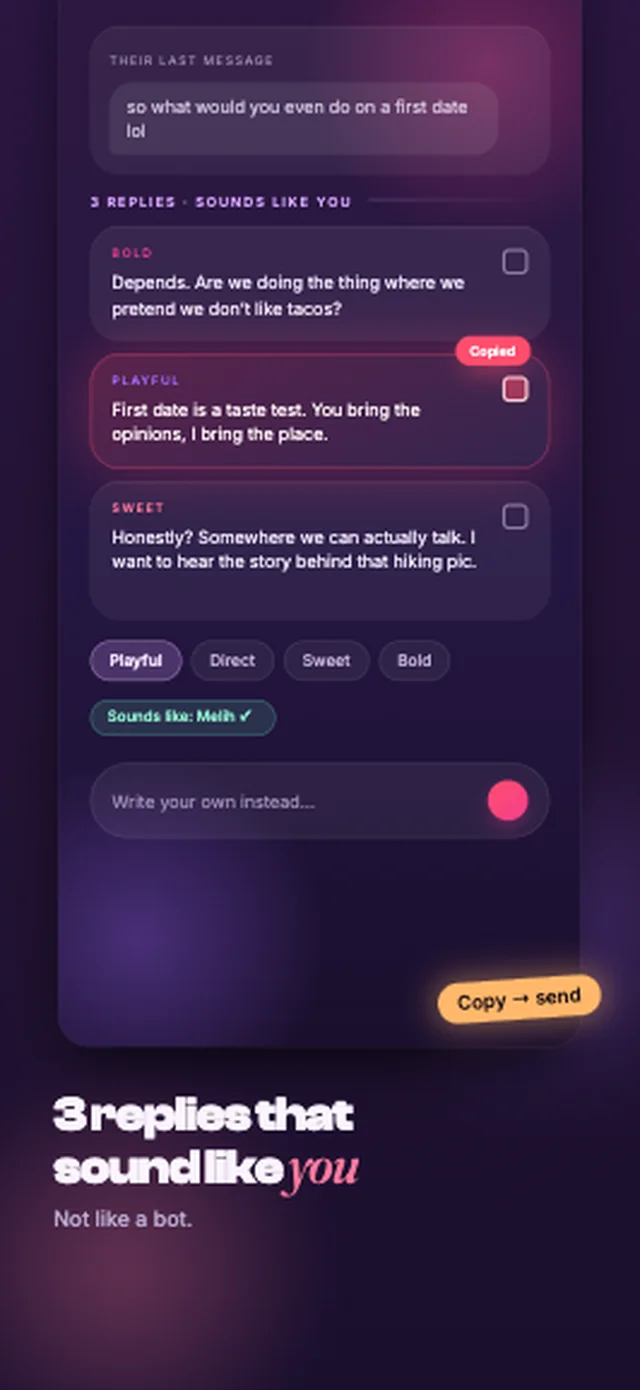
Three drafts, each a different angle, in your voice. Tap to copy, or write your own with the drafts in front of you. Nothing goes anywhere until you send it yourself.
What you actually use
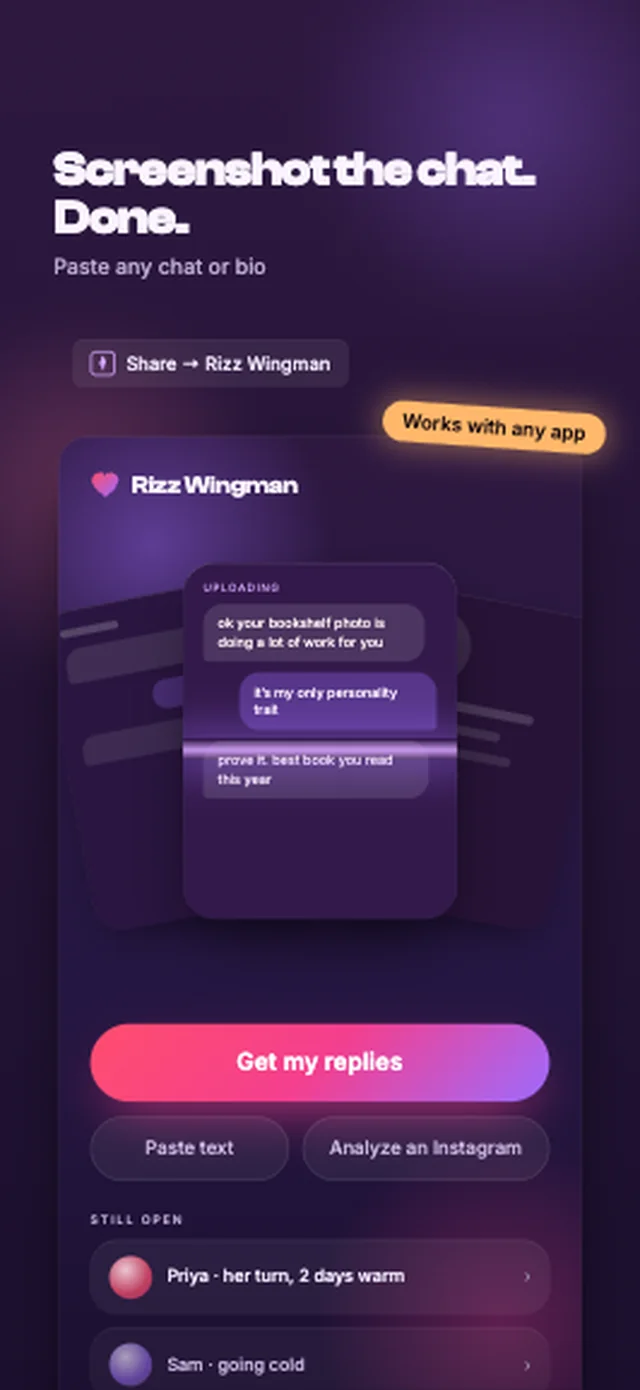
Screenshot the chat. Done.
The upload is the whole setup. No account, no onboarding quiz, no “tell us about yourself” — your first three replies arrive well inside the first minute.
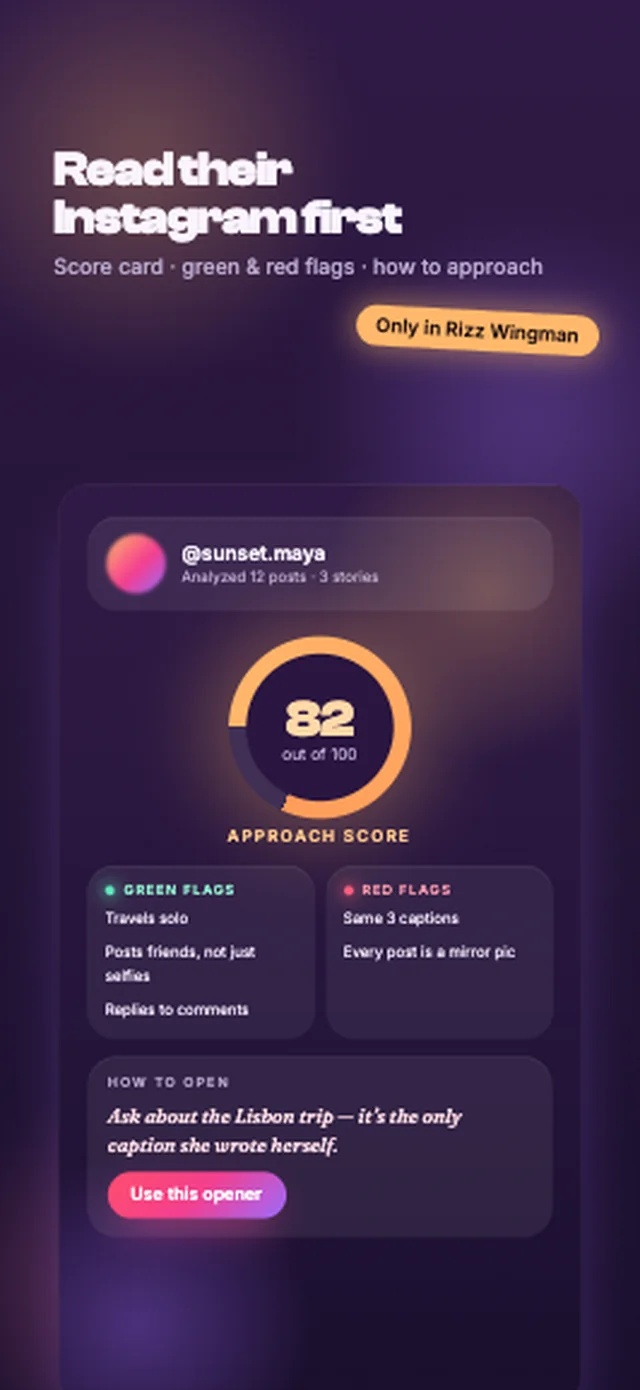
Read their profile first
Give it a handle and get a read: what stands out, green and red flags, and one way to open that comes from something they actually posted. An opinion, clearly labelled as one — and handles are blurred by default if you share the card.
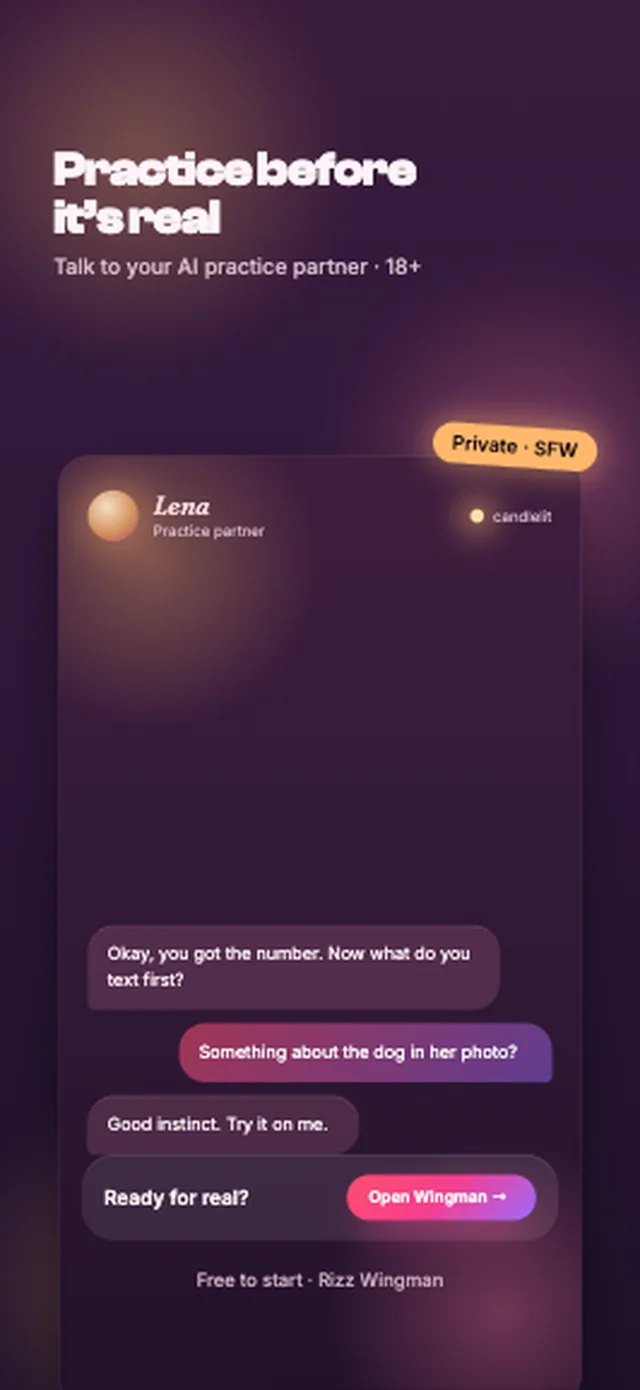
Practice before it’s real
Talk to an AI practice partner who says she is AI, keeps it safe-for-work, and hands you back to your real conversations when you are ready. For the people who freeze, not the people who need a girlfriend app.
Sounds like you, because it read you
The reason AI replies get spotted is that they are written from one message and a tone button. Rizz Wingman writes from the whole thread, the tone you picked, and a style profile you set once: how you phrase things, how you joke, the languages you switch between. The drafts come back with your name on them — literally, a “sounds like you” badge — and the point is that they should.
You still read every one. The app makes drafts, not decisions. Nothing is sent to anyone until you copy it into the conversation yourself, and you can rewrite a draft or ignore all three. A message you did not mean is worse than no message.
Honest about being AI
Everything the app writes is written by a machine, and it says so. Practice partners are introduced as AI, carry an AI label for the whole conversation, and answer truthfully if you ask. Profile reads are labelled as opinions and blur the handle by default when shared. Ask the app to help you pressure, manipulate or deceive someone, or for anything involving a minor, and it declines in plain words.
The full commitments — and where to find real help if a conversation turns serious — are on the AI Safety page.
Honestly, how it compares
Rizz Wingman is a small app from one developer — 4.6 stars and over a thousand downloads from App Store search alone, with no marketing — in a category with well-funded incumbents. Here is where they beat it.
| Instead of Rizz Wingman | Price | Where it is better | Where it leaves you |
|---|---|---|---|
| Rizz | ~$7 / week | The biggest name in the category, with the largest user base and the smoothest onboarding. | Works from the last message alone, so the replies are the same for everyone — and people can tell. |
| Plug AI | ~$7 / week | A solid screenshot-to-reply loop and a well-rated app. | Near-hard paywall, and no context beyond the chat: no profile read, no practice, no sense of how you actually write. |
| Keyboard-style assistants | Freemium | Convenient — the suggestion appears where you are typing. | Jack-of-all-trades tone, and no idea who you are talking to. |
| Asking a friend | Free | Authentic, and they know you. | Slow, mildly humiliating, and unavailable at one in the morning when the message actually arrives. |
The gap Rizz Wingman fills is context: the whole thread, the profile, and your own voice, at a price that is not seven dollars a week. If what you want is the biggest brand, the first row is the better-known buy and this page will not pretend otherwise.
What it costs
Free
$0
- 5 generations a day — replies, openers and profile reads
- 3 practice messages a day
- Every tone and your style profile
- No account, no card
The meter on the Home screen shows what is left today. It resets at midnight.
Pro
$6.99/month
- No daily limits on replies, openers or reads
- No daily limit on practice
- Everything in the free tier
Also $2.99 a week, or $29.99 a year. Cancel any time in iPhone Settings or the Play Store.
Questions people actually ask
Is Rizz Wingman free?
Free to try: 5 generations a day — replies, openers and profile reads — plus 3 practice messages a day, with every feature and no account. The meter on the Home screen shows what is left and it resets at midnight. Pro removes the limits for $2.99 a week, $6.99 a month or $29.99 a year.
I had the old Rizz Wingman. What changed?
Version 3 is a rebuild, not a patch. The app reads the whole thread from a screenshot instead of the last line, writes openers when there is no thread yet, gives you a read on a profile, takes typed text when there is no screenshot, and adds a practice partner. It arrives as a normal App Store update. If you had Pro, tap Restore purchases on the paywall or in the You tab and it comes back.
Do I need an account?
No. There is no sign-up and no login. Open the app, pick a screenshot, get replies.
Will the replies sound like a bot?
That is the problem this app exists to fix. Generic apps write from the last message alone; Rizz Wingman reads the whole thread, the tone you picked, and the style you set — your phrasing, your humour, your languages — so the drafts read like you on a good day. You can still edit every word, and you should.
What happens to my screenshots?
They are processed to write your replies and then dropped. They are not stored, not shown to anyone, and never used to train anything. The privacy policy sets out exactly what is and is not collected.
What is the profile read?
You give the app a handle, and it writes an opinion from what is publicly visible: what stands out, green and red flags, and a way to open. It is an opinion, not a fact about a person, and it does not access anything you could not see yourself.
Is the practice partner a real person?
No, and the app never lets you forget it. Every practice partner is AI, says so when asked, and carries an AI label on screen for the whole conversation. Practice is for adults — 18 and over — stays safe-for-work, and is built to send you back to real people, not to replace them.
Will it help me pressure someone?
No. Ask for manipulation, pressure, harassment or anything involving a minor and the answer is no, in plain words. The AI Safety page explains what the app refuses and why.
Which apps does it work with?
Any app you can screenshot: dating apps, Instagram DMs, WhatsApp, iMessage. There is nothing to connect and no permissions beyond picking a photo.
Is there an Android version?
Yes. Rizz Wingman is on Google Play as well as the App Store, free to try on both with the same daily allowance. Pro belongs to the store you buy it from, so a subscription bought on iPhone does not carry over to an Android phone, or the other way round.
Reading
- How do you respond to "wyd" from a match or crush?
Answer what you are actually doing in one specific line, then hand the conversation back with a question or a plan. Replies to "wyd" for flirty, friendly, busy and late-night situations, what "wyd" usually means, and how to answer when you are not comfortable with where it is going.
- How do you answer "what are you looking for" on a dating app?
Answer in one or two honest sentences, name what you want and what you don't, then ask it back. Example answers for serious, casual and not-sure-yet, how to reply when your answers don't match, and when to ask the question yourself.
- How long should you wait to text back on a dating app?
There is no rule that says wait three hours. Reply when you have a moment and something to say, roughly match the other person's pace, and keep momentum toward a date. What different reply times signal, and what to send after a long gap.
- How do you respond to a compliment over text?
Say thank you, show the compliment landed, then give the conversation somewhere to go. 15 replies you can adapt for "you're cute", profile and photo compliments, plus what to do when a compliment goes too far.
- What should you text before a first date?
Confirm the plan a day ahead, send one short message on the day, and save the big conversation for the date itself. Timing, 12 texts you can adapt, and how to handle running late or cancelling.
- How do you flirt over text without being cringe?
Flirting over text works when it is specific to them, a little playful and easy to reply to, and when you match their energy instead of racing ahead. Examples by stage, what reads as cringe, and how to tell if it is landing.
- What questions should you ask on a dating app?
Ask about something specific on their profile, then follow up on what they say. Forty questions sorted by stage, from the first message to planning a date, plus the ones that feel like an interview.
- How do you tell someone you're not interested over text?
Thank them, say plainly that you are not feeling it, and wish them well, in one short message with no open door. Examples for every stage, what to skip, and what to do if they push back.
- When should you ask for someone's number on a dating app?
Ask once the chat has a real back-and-forth and you are making a plan, often around the time you suggest meeting. The signs it is time, lines that work, and what to do if they say not yet.
- How do you keep a conversation going on a dating app?
Answer what they said, add one thing about you, and ask one follow-up question. The second message, the topics that last, and when to move it to a date.
- What to text after a first date, and when to send it
Text the same evening or the next morning, name one real moment from the date, and say clearly whether you want a second one. Timing, templates, and what to do if they go quiet.
- ChatGPT for dating app replies: make it sound like you
ChatGPT writes good dating-app replies once it has three things. The one-time setup, the prompt to reuse, and where a dedicated app is simply faster.
- Is double texting bad? When a second message helps
A second message is fine when it adds something new. When to double text, how long to wait, what to send, and the two follow-ups that quietly end things.
- Dry texter: what it means and what to send back
Short replies with nothing to build on. The three reasons people dry text, how to tell which one you have, what to send back, and how to stop being the dry one.
- First message on Hinge, Tinder or Bumble: what to send
One specific thing from their profile, one question about it. Who can message first on each app in 2026, fifteen examples, and the five that get ignored.
- How to ask someone out over text, without the limbo
A day, a plan and an easy way to say no, in one message. When to ask, twelve ways to word it, and what each kind of answer actually means.
- How to slide into DMs on Instagram without being weird
Reply to a story about something specific and ask one easy question. How Instagram message requests work, when a DM is welcome, twelve openers, and what to skip.
- What are good Hinge prompt answers? How to write your own
A good Hinge prompt answer is specific, sounds like you, and gives people something easy to reply to. The test it has to pass, thirty real rewrites, and which prompts to avoid.
- Is this message AI-written? Seven tells
Seven things that give away an AI-written message, four that people wrongly treat as proof, and how to check without accusing anyone.
- How do you read a dating profile before you message someone?
Read the photos, prompts and basics for 30 seconds, pick one specific detail, and ask about it. What a profile tells you, the real red flags, and how to turn it into an opener.
- What’s your texting style? Take the quiz
Eight situations, four kinds of texter. Pick what you would actually send, and find out which habit is quietly costing you conversations.
- They stopped replying: what it means and what to do
What silence means at one day, three days and two weeks, the five real reasons behind most of it, and how to decide whether to send one more message.
- How to respond to “hey” on Tinder, Hinge or Bumble
“Hey” is a hand-off, not laziness. Twelve replies that give the conversation somewhere to go, the three that quietly end it, and why “hey” back always fails.
- What is the best rizz app in 2026? 6 tested, free ones included
Which rizz app is best? Rizz, Plug AI, CharmKey, Rizz Wingman, rizz keyboards and ChatGPT compared on price, free tiers, and whether the replies sound like you.
- How to revive a dead conversation on Hinge or Tinder
A quiet conversation is not dead until you send something bad. How to save one that is dying, the message that restarts a dead one, and when to let go.
Your turn to text. You have got this.
Screenshot, tone, three replies. No account, free to try, nothing to cancel.